Platform setup
Stacklok Enterprise ships as an umbrella Helm chart that installs its platform components in one release.
How the platform fits together
The platform runs in your Kubernetes cluster, with a control plane for configuration and identity, gateways for AI client traffic, and an MCP runtime for in-cluster servers.
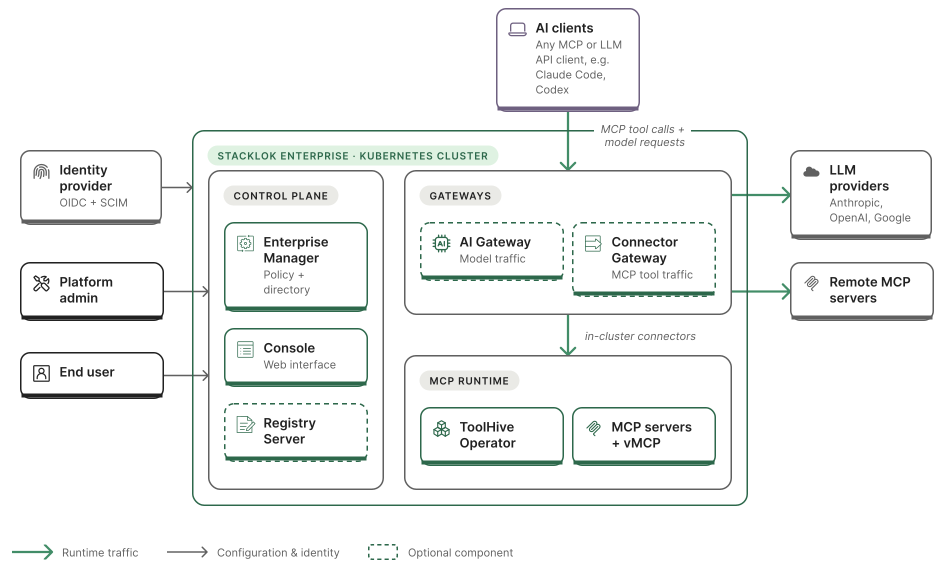
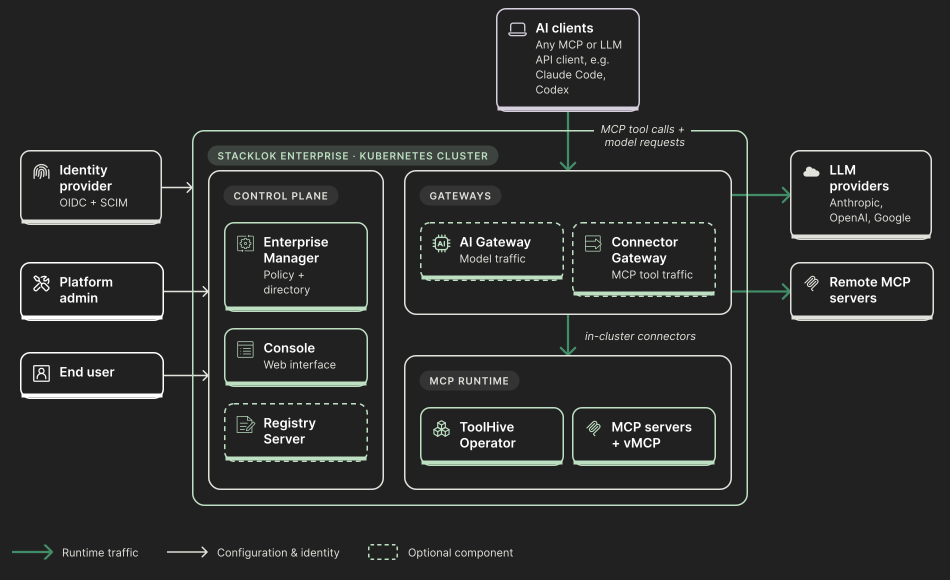
In the control plane, Enterprise Manager serves policy to the Stacklok CLI and maintains the directory of users, groups, and connectors. The console provides the web interface for administrators and end users, and the optional Registry Server holds the approved MCP server and skills catalog. Your identity provider authenticates users and provisions users and groups into the directory.
Two optional gateways govern the traffic your AI clients send. The AI Gateway governs calls to large language model (LLM) providers, and the Connector Gateway governs MCP tool calls to connectors. A connector can be a remote MCP server or one the ToolHive Operator runs in your cluster, including a Virtual MCP Server (vMCP) that aggregates multiple servers. Both gateways use the Enterprise Manager's directory for identity and access configuration.
Green arrows show runtime traffic, and gray arrows show configuration and identity connections. Dashed component borders mark optional components. For the services and dependencies you need to prepare, see the deployment architecture.
Deployment sequence
When you are ready to deploy, work through these steps in order. Each links to its detailed guide.
- Configure identity. Set up your identity provider (authorization server, audiences, scopes, claims, and OAuth clients) so the platform components and clients can authenticate. Do this first, because deployment wires in the client IDs and audiences you create here. See Configure platform identity.
- Deploy the platform. Install the umbrella chart with the identity values from the previous step. The chart deploys the ToolHive operator, the Enterprise Manager, the console, and the Registry Server as subcharts. See Deploy the platform. Before you install, run preflight checks to catch cluster problems before Helm installs the release.
- Enable the gateways you need. Both are off by default. See Configure the AI Gateway and Configure the Connector Gateway.
- Populate the directory. Provision users and groups from your identity provider, since access and budgets are granted to them. See SCIM provisioning.
- Configure policies. Use the Enterprise Manager to pin the registry, control non-registry servers, and standardize telemetry across clients. experience. See Configure policies.
- Set up authorization. Map identity-provider groups and roles to MCP access with the enterprise authorization custom resources. See Enterprise authorization.
- Roll out the clients. Distribute the Stacklok CLI to your users, and point them at Roll out gateway clients to distribute setup instructions for editors and agents.
- Verify end to end. Sign in to the console and confirm the path from catalog to client.
Contents
Deploy the platform
Install the Stacklok Enterprise platform in your Kubernetes cluster as a single Helm release.
Distributed deployments
Spread Stacklok Enterprise components across clusters or environments by enabling only the components each one needs.
Install from a private registry (air-gapped)
Mirror the Stacklok Enterprise chart and images from Replicated into your own container registry, then install the platform from there.
Verify the distribution
Independently verify the signatures, SLSA provenance, and SBOMs of Stacklok Enterprise container images with cosign.
Configure the Registry Server
Enable the Registry Server in the Stacklok Enterprise platform chart and connect it to PostgreSQL.
Configure platform identity
Configure your identity provider so the Stacklok Enterprise platform components can authenticate users and validate their requests.
Configure the AI Gateway
Enable the AI Gateway in the platform chart, connect it to budgets and the directory, and publish its inference endpoint behind the shared Gateway.
Configure the Connector Gateway
Enable the Connector Gateway so each user gets one MCP endpoint that serves only the connectors they're granted, signed in with their own identity.
Roll out gateway clients
Prepare access, budgets, and network reachability before users connect their clients to the gateways, then point them to the console and support them.
Helm values
10 items
API references
Find REST API references for Enterprise Manager, Connector Gateway, and AI Gateway management.
Enterprise Manager API reference
REST API reference for Enterprise Manager administration and automation.